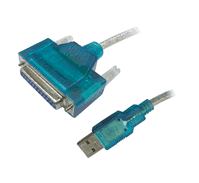
The USB parallel adapter cable is constructed to meet all the USB to IEEE 1284 specification requirements. This product is essentially a flexiable cable that utilizes hardware and software to provide intelligent and transparent protocol conversion between Universal Serial Bus (USB) on the PC side and IEEE 1284 parallel on the printer side. It will allow any Windows or MAC PC with a USB port to print to nearly any parallel printer.
Provides faster downloads to your printer since the USB interface provides 12 Mbps versus only 150Kbps speeds through a standard parallel port.
Instructions for setting up your printer to use this cable under Windows ME and later:
1. Hook your printer to the USB to Parallel cable.
2. Plug the USB connector into the USB port on your computer.
3. Bring up the control panel on your computer, and then bring up "Printers & Faxes" (or similar).
4. If the printer you want to use is listed, right click on it, and then go down to properties. Click on the 'Ports' tab, and put a checkmark next to the highest numbered USB entry (such as 'USB002'). Then, click 'Apply'. If it isn't listed, you will need to add the printer and then select the highest numbered USB port.
5. Click on the 'General' tab, and then click to 'Print a test page'. A test page should be successfully sent to your printer. If it isn't, please make sure that the power to the printer is on, the printer is in an on-line mode, and that the printer is on-line in Windows. If everything seems correct, please try rebooting.
Using on a MAC computer:
To use this adapter on a MAC computer, you will need to download and use the Gimp-Print drivers. We do not provide support for these drivers as they are developed by a 3rd party. They can be downloaded here: http://gimp-print.sourceforge.net.
Free Shipping within the 48 continental USA states! (Online orders only)
Order yours now for immediate shipping. We accept Visa, Mastercard, American Express, Discover and PayPal though our secure server.
We stand behind our product If you need any assistance, you can call us toll-free for the life of the product for free assistance at 1-800-274-7897 (USA & Canada only), or +1-865-988-7906 for those in other areas.
Product comes with a 1 year warranty, and a 30-day money back guarantee with no restocking fee.











 9-pin Female to 9-pin Terminal Block Adapters